Launch command generator
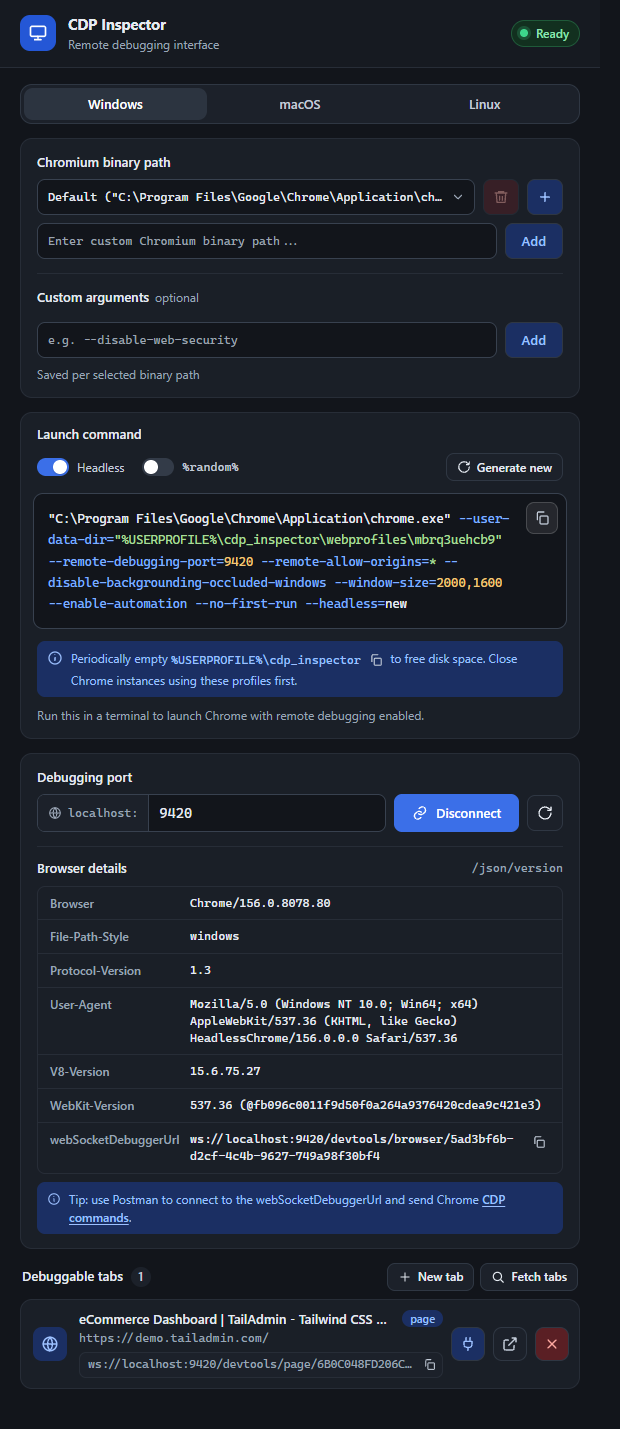
The popup builds the Chrome command line for you - picking a random debugging port (9000–9999) and an isolated profile directory so it never collides with your everyday browser session. It detects your OS automatically via navigator.platform, but you can switch between Windows, macOS, and Linux manually with the segmented control at the top; each OS remembers its own binary path and custom-argument choices independently.
- Headless (on by default) - appends
--headless=new, so the launched Chrome has no visible window. - %random% - when on, the profile directory uses the shell’s own random-value syntax (
%random%on Windows,$RANDOMon macOS/Linux) instead of a value generated once by the extension, so re-running the exact same copied command in a loop gets a fresh profile dir each time. - Generate new - rolls a fresh random port and profile ID immediately.
- The copy button copies the command to your clipboard with a checkmark confirmation; a small banner below reminds you to periodically clear out
cdp_inspector/webprofilesto free disk space.