Screencast and remote control
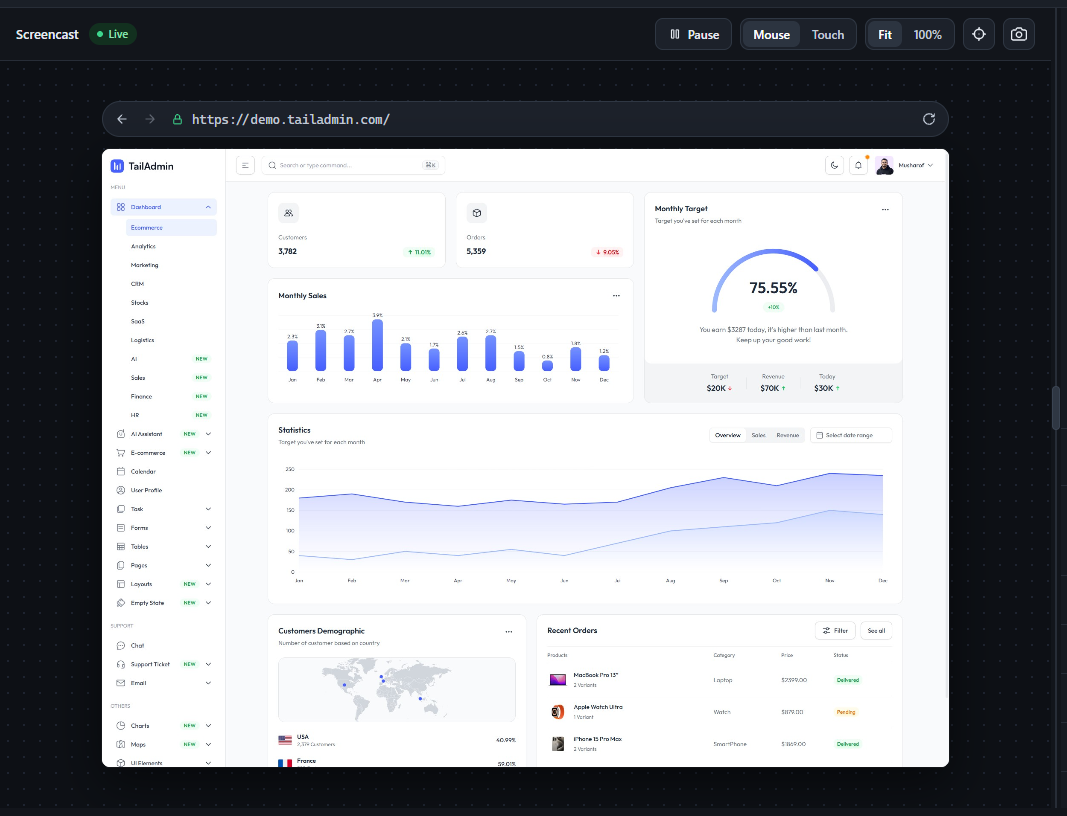
The screencast streams the target page live via Page.startScreencast. It’s fully interactive, not just a view - clicks, drags, scrolls, and keystrokes are translated into real CDP input events and dispatched to the remote page:
- Pause / Live - stop and resume the frame stream.
- Mouse / Touch - choose which input events clicks and drags on the screencast dispatch to the remote page. Touch mode simulates a single synthetic touch point.
- Fit / 100% - scale the screencast to fit the pane or show it at native resolution (coordinate mapping adjusts accordingly, including scroll offset in 100% mode).
- Address bar - navigate the remote page directly, with back/forward/refresh wired to its real navigation history (not just browser-local history).
- Coordinates readout (crosshair icon) - toggles a live “x: _ y: _ · eventType” display of the last input event sent.
- Screenshot button (camera icon) - saves the current frame as a JPEG.
A few details worth knowing: keyboard input is forwarded only while your mouse is hovering the screencast (not on click-to-focus) - a green ring appears around the frame while it’s capturing keystrokes. Right-clicking sends a real right-click to the page instead of opening your browser’s own context menu. Native <select> dropdowns are specially handled: since OS-native popups can’t be screen-captured, clicking one opens a custom-rendered replica of its options positioned over the real element, and your selection is written back into the actual page.