Device profiles
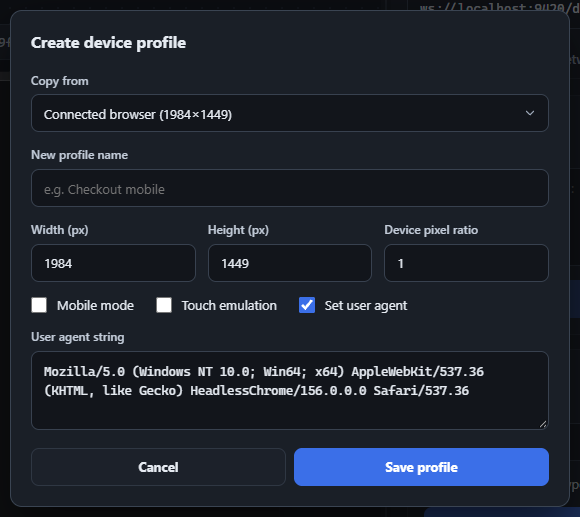
Beyond the built-in iPhone/iPad/Pixel/Desktop presets, you can create unlimited custom device profiles. Click Create Profile (or Edit Profile, enabled once at least one custom profile exists) to open the device profile dialog.
- Copy from seeds every field from an existing profile - including the special “Connected browser” entry, which reflects the real, live dimensions, pixel ratio, user agent, and touch/mobile capability of whatever page is currently attached (refreshed automatically on connect, on navigation, and after applying/clearing emulation).
- Width / Height / Device pixel ratio - numeric fields with sane bounds (1–10,000,000px, 0.1–10 DPR).
- Mobile mode / Touch emulation - independent checkboxes.
- Set user agent - when checked, reveals a required text field for a custom UA string; unchecked, the page’s real UA is left alone.
- Profile names must be unique (case-insensitive) against both built-ins and your other custom profiles, up to 80 characters.
- Delete is only available while editing an existing custom profile (never for built-ins or “Connected browser”).
Applying a profile sends Emulation.setDeviceMetricsOverride, Emulation.setTouchEmulationEnabled, and (if set) Emulation.setUserAgentOverride together; Clear reverses all three. Custom profiles are saved via chrome.storage.local and sync live across every open inspector panel window.